

2-Way Email-SMS Communication
TopView can send and receive email/SMS messages.
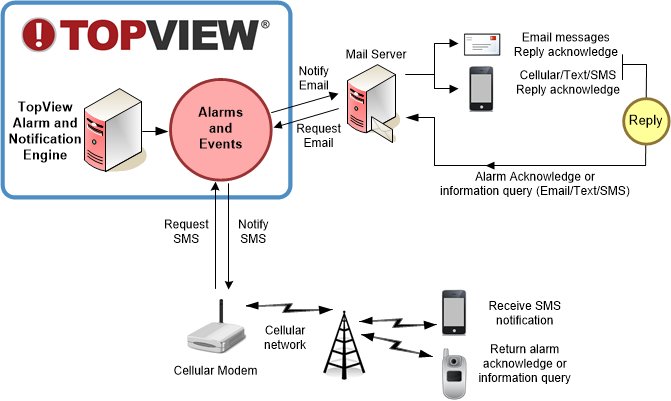
Outgoing notification messages can be sent by TopView when an alarm occurs. These messages can be sent through email (with optional SSL) and a GSM modem on a cellular network.
Incoming TopView messages from Email/SMS can be used to:
- Acknowledge an alarm
Recipient of an outgoing email-SMS notification message can reply to the received message to acknowledge the alarm. Acknowledgement of the alarm confirms that the message was received and can be used to stop escalation of the alarm and notification. - Query the details of one or more monitored points
Users can request the current value, timestamp, alarm and acknowledge state, and alarm message for one or more monitored points. - Request HTML Snapshot Reports (email only)
Users can request current HTML Snapshot Reports which detail current state of monitored points and alarms. The Report can be returned in the body of the message (requires ability to view HTML email) or as an attachment.
There are multiple ways to send and receive text messages with TopView:
- Via email using cell providers’ email-to-text gateways
- Via cellular modem. See our recommended SMS modems list
- Using Twilio
Cellular modems allow sending text messages for devices without access to an email server. We list recommended modems for use with TopView.
The cellular modem requires a SIM card with SMS plan.
Ready to get started?
Contact Exele today or download a free trial version of TopView